Azure tag compliance from 20% to 100%, and the audit it unlocked
Only 20% of an EdTech company's Azure resources were tagged, so nobody could say who owned what or what it cost. I standardised tags with Azure Policy to reach 100% of taggable resources, then used them to find orphaned resources and feed a 30% cost reduction.
- Client
- An AI-powered EdTech company
- Role
- Senior Cloud & DevOps Engineer
- Published
- Reading time
- 7 min
Results at a glance
- Tag compliance (taggable resources)
- 100%
- Before: 20%
- Azure cost (wider cost programme)
- −30%
- Before: Baseline
- Tagging decisions needed
- 31 groups
- Before: 232 resources
TL;DR
- Problem: only about 20% of the company’s Azure resources were tagged, and the tags that existed had drifted into inconsistent keys and values. Nobody could reliably say who owned a resource, which project it served, or what an environment cost.
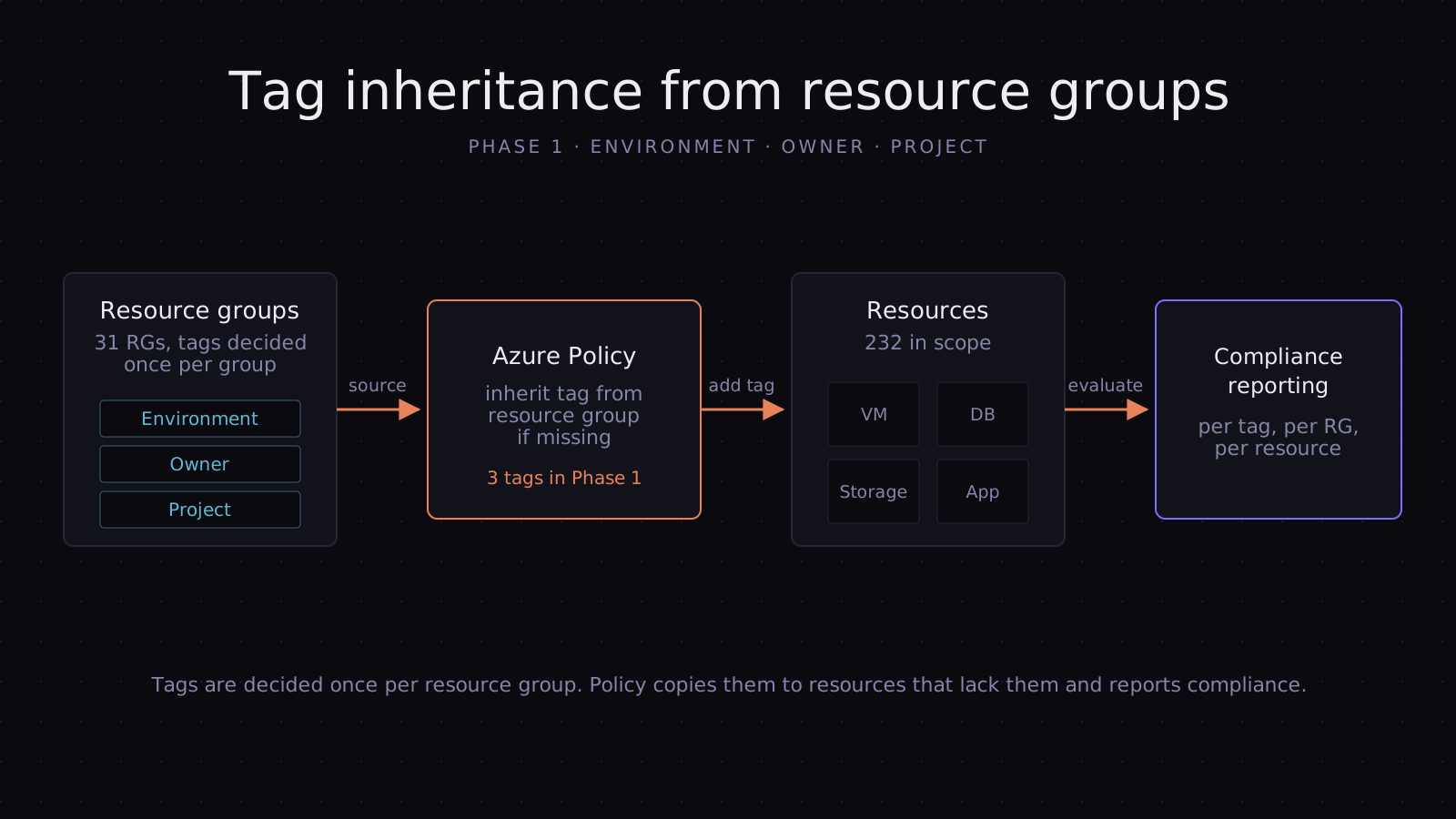
- Approach: I inventoried 232 resources across 31 resource groups, defined a deliberately small Phase 1 standard (Environment, Owner, Project), made one tagging decision per resource group instead of per resource, and used Azure Policy to inherit those tags onto every resource and keep them there.
- Result: 100% of taggable resources carry the required tags. With ownership finally visible, I ran the estate’s first full resource audit. It surfaced orphaned and unused resources that were still billing, and removing them contributed to a 30% reduction in Azure costs.
The lesson in one line: tagging isn’t housekeeping. It’s the prerequisite for every cost and ownership decision that follows.
Context
The company builds AI-powered education products on Microsoft Azure: a multi-service estate spanning compute, data, streaming and ML workloads. The scope of this work was 232 resources in 31 resource groups.
A review of the subscription flagged low tagging compliance as a key risk. Resource audits weren’t part of normal operations, so resources tended to outlive the work that created them, and no one could tell which were still needed.
The problem
Tags are how Azure answers three practical questions: what does this cost, who owns it, and what is it for? Here, the answers weren’t there.
Most resources had no tags. Only around 20% were tagged at all.
The tags that existed had drifted. The same concept appeared under different keys and values, typical of tags added by hand over time:
| Concept | What drift looks like |
|---|---|
| Environment | Environment, environment, env, Env |
| Environment value | Production, prod, Prod, PROD |
| Owner | Owner, owner, CreatedBy, a person’s name in one place and a team in another |
Azure treats tag values as case-sensitive, so prod and Production land in different buckets in cost reports. Different keys, such as env and Environment, never group together at all.
The consequences were concrete:
- No cost attribution. Azure Cost Management groups spend by tag. With missing or inconsistent tags, spend couldn’t be split by environment or project, so no one could see where the money was going.
- No ownership. When a resource looked idle, there was no one to ask whether it was safe to delete, so nothing was deleted.
- No safe way to audit. You can’t clean up what you can’t attribute. Without tags, a cost audit is guesswork.
Constraints
- Running workloads. Production services had to keep running. The rollout could not block deployments or require downtime.
- Not everything can be tagged. Some Azure resource types don’t support tags, so compliance had to be measured against taggable resources only. Otherwise the target is unreachable and the number is meaningless.
- Scale versus reviewability. Deciding tag values for 232 resources one by one would have been slow, error-prone and impossible for owners to review properly.
Approach and decisions
| Decision | Alternative considered | Why I chose this |
|---|---|---|
| Phase 1 = three tags (Environment, Owner, Project) | A full tagging standard on day one | A short standard that reaches 100% beats a long one stuck at 40%. These three answer the cost, ownership and purpose questions. |
| Decide per resource group, inherit to resources | Tag each of the 232 resources individually | 31 reviewable decisions instead of 232. Resources in a group usually share an owner, environment and project, and new resources inherit tags automatically. |
| Enforce with Azure Policy | A one-off tagging script | A script fixes today’s data, then drift returns. Policy keeps new and changed resources compliant and reports compliance continuously. |
| Inherit missing tags rather than block | Deny resources without tags | Deny would break pipelines and deployments mid-rollout. Inheritance fixes the data without blocking anyone. |
| Built-in policies first, custom only for gaps | Writing every rule as a custom definition | Built-in definitions are maintained by Microsoft and easier for the next engineer to understand. Custom definitions covered only what the built-ins couldn’t. |
| Measure against taggable resources | Raw percentage of all resources | Resource types that can’t hold tags would cap compliance below 100% forever and hide real gaps. |
The trade-off with group-level inheritance: a resource that genuinely differs from its group needs an explicit tag on the resource itself. The policy only adds tags that are missing, so explicit tags are never overwritten.
The Phase 1 standard
| Tag | Question it answers | Example values |
|---|---|---|
Environment |
What is it for, and how careful must we be? | Production, Staging, Development |
Owner |
Who do we ask before changing or deleting it? | A team or a named owner |
Project |
Which product or workload is paying for it? | The product or workload name |
One spelling per key and a fixed list of values. Everything else waits for a later phase.
Implementation
flowchart LR
  accTitle: Tag governance and cost audit workflow
  inv[Inventory<br/>232 resources] --> ana[Drift and compliance<br/>analysis]
  ana --> rg[Tag decisions<br/>31 resource groups]
  rg --> pol[Azure Policy<br/>inherit tags]
  pol --> rem[Remediate existing<br/>resources]
  rem --> aud[Resource audit<br/>by owner and project]
  aud --> del[Remove orphaned<br/>and unused resources]
1. Inventory and analysis. I exported every resource and its tags, then built a multi-sheet Excel compliance workbook: drift analysis of tag keys and values, compliance per resource group, and the proposed tag values for each group.
2. Resource-group decisions. For each of the 31 groups, I recorded the Environment, Owner and Project values, so owners reviewed one row per group rather than hundreds of resources.
3. Policy. The core is Azure’s built-in “Inherit a tag from the resource group if missing” definition, assigned once per required tag. It runs in Indexed mode, which evaluates only resource types that support tags, and uses the modify effect to copy the resource group’s tag onto any resource that lacks it. A few custom definitions covered cases the built-ins didn’t.
4. Remediation. Policy only acts when a resource is created or updated, so existing resources need a remediation task. I generated the CLI commands for each tag (sanitised):
# Built-in: "Inherit a tag from the resource group if missing"
POLICY_ID="/providers/Microsoft.Authorization/policyDefinitions/ea3f2387-9b95-492a-a190-fcdc54f7b070"

for TAG in Environment Owner Project; do
  NAME=$(echo "$TAG" | tr "[:upper:]" "[:lower:]")

  az policy assignment create \
    --name "inherit-tag-${NAME}" \
    --display-name "Inherit ${TAG} tag from resource group" \
    --policy "$POLICY_ID" \
    --scope "/subscriptions/<subscription-id>" \
    --params "{\"tagName\": {\"value\": \"${TAG}\"}}" \
    --mi-system-assigned --location "<region>" \
    --role Contributor --identity-scope "/subscriptions/<subscription-id>"

  az policy remediation create \
    --name "remediate-${NAME}-tag" \
    --policy-assignment "inherit-tag-${NAME}" \
    --resource-discovery-mode ReEvaluateCompliance
done
5. Resource audit. With every taggable resource attributed to an owner, environment and project, I ran a full resource audit, which hadn’t been routine before. It found resources that were orphaned or no longer in use but still incurring cost:
- unattached managed disks
- unused public IP addresses
- old snapshots
- idle or forgotten virtual machines
- unused SaaS and marketplace subscriptions
Because each one now had an owner, it could be confirmed as unneeded and removed rather than left “just in case”. That step is where tagging turned into savings.
Results
| Measure | Before | After |
|---|---|---|
| Tag compliance (taggable resources, 3 required tags) | ~20% | 100% |
| Tagging decisions to review | 232 resources | 31 resource groups |
| Resource audits | Not routine | Full audit completed |
| Azure cost | Baseline | −30%, with the audit’s cleanup as a contributor |
Compliance is measured against taggable resources in the Azure Policy compliance view. The 30% figure is the overall cost reduction. Removing orphaned and unused resources found by the audit was one of its contributors, alongside other cost work.
Beyond the numbers, the estate became attributable: spend can be grouped by environment and project in Cost Management, every resource has an owner to ask, and policy keeps it that way without anyone having to remember.
What I’d do differently, and next phases
Start the audit and the tagging together. I tagged first and audited second. Running a lightweight orphan scan on day one, for resources that are unused whatever their tags, would have started some savings weeks earlier, while tagging handled the resources that needed an owner’s decision.
Make the audit a query, not a project. The audit found waste because nobody had looked in a long time. The next step is to codify it as saved Azure Resource Graph queries, reviewed monthly, so waste can’t quietly build up again. For example, unattached disks with their owner:
resources
| where type =~ 'microsoft.compute/disks'
| where properties.diskState =~ 'Unattached'
| project name, resourceGroup, owner = tostring(tags['Owner']), sizeGb = toint(properties.diskSizeGB)
| order by sizeGb desc
Close the gap at the source. Inheritance covers resources, but a new resource group created without tags passes nothing down. Once compliance is stable, a Deny policy on resource groups missing the three tags, plus default tags in infrastructure as code, stops drift before it starts.
Phase 2 with finance. Add a cost-centre tag agreed with finance, so cost reports map directly to budgets, and set a monthly budget alert per project now that spend can be split by project.
Tech stack
Azure · Azure Policy · Azure CLI · Azure Cost Management · Excel